Frugal Coupon Living

Stretching Your Pennies, Saving Your Dollars

  • Email
  • Facebook
  • Instagram
  • Pinterest
  • Twitter
  • Home
    • Home Page
    • About Ashley at Frugal Coupon Living
    • Contact
  • Shop
    • Frugal Coupon Living Shop
    • Etsy Store
    • TPT Shop
    • Elf Printables
    • Shipping Policy
  • Printables
    • Shop
    • All Printables
    • Free Printables Library
    • Free Elf Printables
  • Games
  • Party
  • Deals
  • Seasonal
    • Easter
    • Spring
    • April Fools Day
    • Mother’s Day
    • Father’s Day
    • Summer
    • Back to School
    • Halloween
    • Thanksgiving
    • Black Friday & Cyber Monday
    • Christmas
    • New Year’s Eve
    • Valentine’s Day
    • All Seasonal
  • Christian Resources
    • Christian Resources Shop
    • TPT Christian Crafts
    • Etsy Christian Prints
    • Youth Group Games
    • Sunday School Lessons
    • Scripture Cards
    • More Christian Resources

Altoid Tin Craft | Tic Tac Toe Travel Game

This post may contain affiliate links or ads. Read my privacy policy and disclosure policy here.

March 29, 2019 by Ashley at Frugal Coupon Living Filed Under: Crafts, DIY, Facebook, Instagram, Pinterest, Social Media, Travel

published date: June 30, 2018
modified datt: March 29,2019

How fun is this Altoid Tin Craft? We created a  Tic Tac Toe Travel Game using an upcycled Altoids Tin Box.

Altoid Tin Craft – Tic Tac Toe Travel Game

Altoid Tin Craft

Are we there yet?! Familiar with the tune of this common question? We put together a cute DIY Altoids Tin Game you can make with your child. Not only is this  a great rainy day activity for the kids, it could result in some bought time on your next car ride and help you avoid the age old question – Are we there yet?!

Using supplies you likely have around the home – card stock, washi tape, buttons, glue and magnets, create your own DIY Tic-Tac-Toe Travel Game! This is a very simple craft and requires a little supervision from an adult. It oculd be a fun DIY gift to give a friend. Pair with some other Travel Game Ideas and make a Road Trip Bucket as a birthday present.

Are you the one traveling? You will want to check out these posts as well!

  • Airplane Bingo Printable (or Tic-Tac-Toe)
  • Road Trip Bingo Printable (or Tic-Tac-Toe)
  • Airplane Activities for Kids
  • Road Trip Hacks and Tips

Tic Tac Toe Travel Game

Supplies:

  • Altoids tin
  • Colorful cardstock
  • Colorful buttons (at least two colors)
  • Small magnets
  • 1/4” washi tape
  • Scissors
  • Pen/pencil
  • E6000 glue
  • Glue stick


Altoid Tin Craft - Tic Tac Toe Travel Game Supplies

Directions:

  1. Trace the bottom of your Altoids container on two different colorful cardstock sheets. ( We did a solid for the bottom and a colorful pattern for the top).
  2. Cut out your traced Altoids container card stock paper.
  3. Use your washi tape to make a tic tac toe pattern onto the solid sheet.
  4. Glue the colorful pattern to the inside top of the Altoids tin and the solid color to the bottom with your glue stick.
  5. Carefully glue one magnet to the bottom of each button until you have 2 sets of the same 5 color button magnets.
  6. Let your magnets dry overnight.
  7. Store your magnets in the tin, they will stick to the inside top or bottom for a great travel tic tac toe game.

*Keep magnets away from small children, always supervise while using

How fun is this Altoid Tin Craft? DIY tutorial on a Tic Tac Toe Travel Game using an upcycled Altoids Tin Box. #FrugalCouponLiving #travel #tictactoe Click to Tweet

Altoid Tin Craft - Tic Tac Toe Travel Game


Also enjoy these Upcycled Altoids Tin Ideas. Pin to Pinterest.

This Altoids Game Idea goes great with our Airplane Activities for Kids. Pin to Pinterest.

Going on the road? Instead check out these Road Trip Hacks and Tips. Pin to Pinterest.

Mom might want to flag these! Winning Car Hacks for Moms. Pin to Pinterest.


WHAT’S TRENDING? Looking for a few engaging activities? Grab Minute to Win it Games – Traditional, Holiday, Group, and more! Use these fun activities in the office, classroom, or at your next birthday party.

Christmas in July – Creative Ways to Upcycle Christmas Lights

This post may contain affiliate links or ads. Read my privacy policy and disclosure policy here.

March 29, 2019 by Ashley at Frugal Coupon Living Filed Under: Crafts, Facebook, Home Improvement, Instagram, Pinterest, Social Media

published date: June 24, 2018
modified datt: March 29,2019

Want creative ways to celebrate Christmas in July? Take a look at these craft ideas to Upcycle Christmas Lights. 

Christmas in July – Creative Ways to Upcycle Christmas Lights

Christmas in July – Creative Ways to Upcycle Christmas Lights

It’s beginning to look a lot like Christmas!… or July. Haha, in this heat, one can dream! We could creative ways to Upcycle Christmas Lights for the winter season for for the dead of summer!  From adorable ways to add flair to your garden to cute ideas for your Christmas mantle! Save these ideas for all year long.

Enjoy!

Upcycled Egg Carton Craft – DIY Flower String Lights

Adorable for a birthday, turn party hats and Christmas lights into Birthday String Lights | Creme de La Craft

Make a flameless fire pit! This is adorable for a summer campout.  (Also need in our Glamping Ideas.) | Free People

So there isn’t a tutorial on this whimsical dream catcher, but it might be something you can create on your own or purchase online! | Ling’s Moment Feather Dream Catcher


Drill a hole in the bottom of an empty wine bottle and thread the cord through, then fill the bottle with string lights. You can also use battery operated lights! | Source Unknown

Feeling likes festive party? Turn your Christmas Lights into DIY Candy Lights. | Oh Happy Day

I really love this one! Create a Hula Hoop Chandelier. We suggest spray paining the hoola hoop first with gold or another coordinating color for your home! | Sarah with an H

Another idea with a warm ambiance is to wrap trees in Christmas lights. (Also seen in our Midsummer Night Patio Ideas.) | Weddings by Lilly and Steven Michael Photography

I am obsessed with these Ping Pong Ball Christmas light strands – cute for a teen bedroom, college door, or screened porch. | The Surznick Common Room

Upcycle Christmas lights into more beautiful DIY Christmas Mantle Lights! | A Beautiful Mess

Create a walkway with Christmas Lights and Recycled Beer Bottles. (Also seen in our Midsummer Night Patio Ideas.) | Snacker Doodles

Need we say more?  Cactus Shrinky Dinks Lights. You will need this for making your cactus. | We’re Going to Make It

Turn your lights into a light up rug – how cute! | Sans Limites Crochet

Wrap hula hoops to make this light up feature. | Deborah Silver

Create party lights with upcycled old bottles and stringed lights. | Crafts for All Seasons

Gather those Dixie Cups and make this Christmas Light Garland. | Rhiannon Bosse

This is a sweet touch for an outdoor patio or fence. We are having trouble finding the original source but it looks like mason jars with cork tops, maybe hot glue the tops in the jar and insert the light! | Original Pin

Want creative ways to celebrate Christmas in July? Take a look at these fun ways to Upcycle Christmas Lights Click to Tweet

This space is totally personalized with photographs and so magical with the additional lighting – a perfect teen bedroom or dorm room makeover! This is a great Instagram craft idea. (Also seen in our Teen Bedroom Ideas.) | Urban Outfitters Blog

Why touch the lighter. Toss some Christmas lights over wood for this Glamping Hack!  (Also need in our Glamping Ideas.) | Source Unknown

Grab some origami paper and make boxes to create this festive Christmas light strand. | Guusje’s Appeltaart

Biking this summer? Get festive with Christmas Lights on your Bicycle. | Eleanor’s NYC

Fun for the holidays but can be used any time of the year, create burlap garland. | Create Craft Love


Christmas in July – Creative Ways to Upcycle Christmas Lights

We have other ideas for creating a warm ambiance with light. Take a look at these Midsummer Night Patio Ideas. Pin to Pinterest.

And if you are celebrating Christmas in July or in December, enjoy these Christmas Traditions (to begin now!) Pin to Pinterest.


WHAT’S TRENDING? Looking for a few engaging activities? Grab Minute to Win it Games – Traditional, Holiday, Group, and more! Use these fun activities in the office, classroom, or at your next birthday party.

Character Cake Tutorial – Easy Thomas the Train Cake

This post may contain affiliate links or ads. Read my privacy policy and disclosure policy here.

March 29, 2019 by Ashley at Frugal Coupon Living Filed Under: DIY, Facebook, Instagram, Pinterest, Recipe, Social Media

published date: June 08, 2018
modified datt: March 29,2019

The simplest Character Cake Tutorial. We made an easy Thomas the Train Cake for our train birthday party theme, but this cake can be done with your child’s favorite character including Elmo, Paw Patrol, Dora and more.

Character Cake Tutorial – Easy Thomas the Train Cake

Character Cake Tutorial - Easy Thomas the Train Cake

Have you ever seen a cake at a party and thought they must have spent a fortune, then to find out the hostess made the cake themselves. I am always impressed by people’s talents only to find out that some things just aren’t as impossible as I think. With the dawn of Pinterest, Instagram and more,  creative food crafts are much easier than one would think. We had fun with this Thomas the Train Character Cake*. Using a coloring sheet and some creativity, we made this cake look like a million bucks! Follow our steps with Thomas and make your own character cake to fit your party’s theme.

*In retrospect, I wish I would have done white on the outside instead of blue because it would have made Thomas stand out more!


Thomas the Train Cake Tutorial

Supplies:

  • Baked Cake (any size works, I did 2 9×9 round cakes stacked on each other)
  • Picture of character (the more simple the picture the better!)
  • Printer/copier/scanner – or you could go to an office supply store that has copiers that enlarge or shrink images
  • Frosting – I used the Wilton’s Buttercream Recipe and find that this works best
  • Food Coloring
  • Frosting Bags
  • Frosting Tips – I used either the plain Circle Tip or the Star Tip
  • Scissors
  • Toothpicks

Step by Step Character Cake Tutorial - Thomas the Train

Directions:

  1. First decide what size cake you want to make (see the cheat sheet below to help with sizing.)
  2. Find the image of the character you want (I just Googled ‘Thomas the Train coloring pages’), like I said, and go for simple and easy when choosing!
  3. Print out the image, then resize it according to the size cake you want to make.
  4. You can either do this with a home scanner, or you can go to your local office supply store where they have those capabilities (usually costs under $1.00)
  5. Be sure to have 2 images printed out. You will be cutting one up and using the other one as a reference guide.
  6. After you have baked your cake and its cooled and your frosting is prepared, divide up the frosting and add the food coloring according to your character’s colors.
  7. Place colored frosting in frosting bags with tips.
  8. Cut out your image around the border and place on the cake.
  9. Trace with a toothpick.
  10. Pick up image and cut along a different border in the image, working your way inwards, align to the traced edges you just did and trace a little more with the toothpick.
  11. Once you have all your lines traced, use your other image as a guide (because it can get a little confusing just looking at all the lines and trying to figure out what is what), and start filling in with colored frosting!
  12. I used the simple dot method to fill in and find this the easiest and most effective way.
  13. Slice and enjoy!
The simplest Character Cake Tutorial. We made an easy Thomas the Train Cake for our train birthday party theme, but this cake can be done with your child's favorite character. #frugalcouponliving #thomasthetrain Click to Tweet

Character Cake Tutorial - Easy Thomas the Train Cake


This Cake Sizing Chart from U Create is very helpful when deciding the size of your character cake!

cake-size-chart-u-create


Share-Post-on-Pinterest-Frugal-Coupon-Living

Also take a look at our Monster Snacks for Kids and Monster Party Ideas. Pin to Pinterest.

Monster-snacks-frugal-coupon-living

Also enjoy one of our favorites, Cookie Monster Ice Cream. Pin to Pinterest.

cookie-monster-ice-cream-frugal-coupon-living-Collage

Print
clock clock iconcutlery cutlery iconflag flag iconfolder folder iconinstagram instagram iconpinterest pinterest iconfacebook facebook iconprint print iconsquares squares iconheart heart iconheart solid heart solid icon

Character Cake Tutorial – Easy Thomas the Train Cake

  • Author: Ashley at Frugal Coupon Living
Print Recipe

Ingredients

  • Baked Cake (any size works, I did 2 9×9 round cakes stacked on each other)
  • Picture of character (the more simple the picture the better!)
  • Printer/copier/scanner – or you could go to an office supply store that has copiers that enlarge or shrink images
  • Frosting – I used the Wilton’s Buttercream Recipe and find that this works best
  • Food Coloring
  • Frosting Bags
  • Frosting Tips – I used either the plain Circle Tip or the Star Tip
  • Scissors
  • Toothpicks

Instructions

  1. First decide what size cake you want to make (see the cheat sheet below to help with sizing.)
  2. Find the image of the character you want (I just Googled ‘Thomas the Train coloring pages’), like I said, and go for simple and easy when choosing!
  3. Print out the image, then resize it according to the size cake you want to make.
  4. You can either do this with a home scanner, or you can go to your local office supply store where they have those capabilities (usually costs under $1.00)
  5. Be sure to have 2 images printed out. You will be cutting one up and using the other one as a reference guide.
  6. After you have baked your cake and its cooled and your frosting is prepared, divide up the frosting and add the food coloring according to your character’s colors.
  7. Place colored frosting in frosting bags with tips.
  8. Cut out your image around the border and place on the cake.
  9. Trace with a toothpick.
  10. Pick up image and cut along a different border in the image, working your way inwards, align to the traced edges you just did and trace a little more with the toothpick.
  11. Once you have all your lines traced, use your other image as a guide (because it can get a little confusing just looking at all the lines and trying to figure out what is what), and start filling in with colored frosting!
  12. I used the simple dot method to fill in and find this the easiest and most effective way.
  13. Slice and enjoy!

Did you make this recipe?

Tag @frugalcouponliving on Instagram and hashtag it #frugalcouponliving

Recipe Card powered byTasty Recipes


WHAT’S TRENDING? Looking for a few engaging activities? Grab Minute to Win it Games – Traditional, Holiday, Group, and more! Use these fun activities in the office, classroom, or at your next birthday party.

How to Make Stickers Using the Cricut Machine

This post may contain affiliate links or ads. Read my privacy policy and disclosure policy here.

March 29, 2019 by Ashley at Frugal Coupon Living Filed Under: Crafts, DIY, Facebook, Instagram, Pinterest, Social Media

published date: June 09, 2018
modified datt: March 29,2019

If you’re looking for an easy tutorial on how to make stickers using the Cricut machine, then you’re in the right place. I will simplify the process, so you can focus on your creativity. Continue reading this easy step-by-step tutorial.

How to Make Stickers Using the Cricut Machine

Making stickers is one of the fastest growing trends, and not just for creatives. There are planners to decorate, containers to label, invitations to hand out, and the list can keep going on.

Learning how to make stickers using the Cricut machine isn’t that difficult with the right tips and help along the way. And today, I’m going to guide you through the Cricut Design space and show you how you can make your own stickers.


Powered by Creative Market

How to Make Stickers Using The Cricut Machine

For this project, you will need printable sicker paper for your machine. Cricut has it online and it is often discounted.

The first thing you’ll want to do is create your stickers. You can do this by using programs such as Microsoft 3D Paint or Procreate, which is a drawing app available on Apple products.

Stickers made for Cricut

Once your stickers are created in the program of your choice, you’ll want to outline your images in a light grey color (make sure to leave plenty of white space around your images) so the Cricut machine will know where to cut.

I would strongly recommend using the light grey color because this color will not show when your stickers are cut. Once your image is ready, save your file as a JPEG for easy uploading into Cricut Design Space.

Next, you’ll want to log into Cricut Design Space and select “Create a New Project.” You’ll want to go to the bottom left of your screen and select “Upload.”

Upload your greyscale image and select “complex” so you will have all of your features and colors from your stickers. This is especially important if your stickers are very detailed. Then select “continue.”

Since you don’t want to print out any of your grey colors from your stickers, you want to click on the wand in the top-right hand corner of your screen.

Then click on any grey area of your image and watch the grey be replaced with a checkered pattern. This tells Cricut Design Space to only print your stickers and ignore everything else on the page. Select “continue” to make your stickers.

After you select “continue” you’ll be presented with two options of what you want Cricut Design Space to do with your sticker image. You’ll want to select the option on the left, which is “Save as a print then cut image.”

Don’t forget to name your image what you’d like your file to be known as (this is on the right-hand side of the screen). Then select “save.” Select your image once your file has been uploaded and select “Import Image” so your stickers are inserted into Design Space.

Once your stickers are imported into Cricut Design Space you can easily rotate your image, make your stickers larger or smaller, depending on the size you’d like to print from your printer. If you need to duplicate or rotate your image, you can do so now.

Once your stickers are the size you want, go ahead and select the “Make It” button in the top right-hand corner of your screen.

After you select “Make It” double check to make sure your image is the size and quantity you’d like to print and cut. If so, select “Continue” in the bottom-right of your screen. You’ll then want to print images on the printer of your choice.

Please remember to insert your sticker printer paper into your machine before selecting the print option. This will save you a headache and you won’t find yourself rushing to your printer or wasting ink.

From the print option, you’ll want to select the printer of your choice, leave copies at 1 (if making one page), and turn off the “Bleed.”

Once your stickers are printed out, make sure your Cricut machine is on and connected.

Next, select the “Paper” option under materials and “Continue.” After you place your sticker paper onto your Cricut mat and insert this into the machine, your fine-point tip cutter will do the rest of the work. (Remember to match your sticker paper and lay your paper down on your Cricut mat as the image is showing in your Design Space.)

Then, enjoy your new stickers!

What kind of stickers are you planning on making? Do you have any questions about using the Cricut machine? Ask and share in the comments below.

Easy and Simplistic Tutorial on How to Make Stickers Using the Cricut Machine @OfficialCricut #circutdesignspace #tutorial Click to Tweet


Take a look at these Cricut Freebies – Tutorials for Your Cricut Projects. Pin to Pinterest.

We love our Cricut Monogram Tutorial. Pin to Pinterest.

Want Another Cricut Tutorial? Learn How to Add Your Own Images to Cricut Design Space. Pin to Pinterest.

A common sought after tutorial – How To Cut Vinyl in Cricut Design Space. Pin to Pinterest.


WHAT’S TRENDING? Looking for a few engaging activities? Grab Minute to Win it Games – Traditional, Holiday, Group, and more! Use these fun activities in the office, classroom, or at your next birthday party.

DIY LEGO Travel Case

This post may contain affiliate links or ads. Read my privacy policy and disclosure policy here.

March 29, 2019 by Ashley at Frugal Coupon Living Filed Under: Crafts, DIY, Facebook, Instagram, Pinterest, Social Media

published date: May 12, 2018
modified datt: March 29,2019

Make your own LEGO Travel Case. This DIY LEGO craft has building block compatible tape and a tin pencil case. It’s a great travel with kids idea!

DIY LEGO Travel Case

DIY LEGO Travel Case

We live in the suburbs of DC. When we take road trips, it takes hours just to get outside the surrounding area of the district. For example, we recently took a trip to the Outer Banks which was supposed to be a  trip less than 5 hours. The car time took 9 hours! Talk about some creative ideas mom had to come up with the make her entire family of 5 happy. That was a trip without a single DVD too!

My number one tip when traveling with kids is making sure that you have snacks. Having well fed tummies makes everyone happy. Also, I find too much sugar in my kids equates to getting car sick, so I have water over a sugary drink. Beyond food and drinks, I have to gather creative crafts. this personalized LEGO bin came in handy when taking our last road trip. We sorta made a game out of it. My girls love the Food Network challenges where they are required to get five ingredients. I told the girls they could use 9 LEGOs to make something and then we compared our final creations and had a vote on who was the most creative.

For this DIY LEGO Case, we found this LEGO Compatible Tape to be best, but there are a lot of building block tape options on Amazon.  Since I am a last minute shopper, my Amazon Prime Membership allowed it to arrive in 2 days and I whipped up this craft really quick before our adventures!

What do you find necessary for the road when you travel with kids? Take a peak at our  Road Trip Hacks and Tips.

Supplies:

  • LEGO compatible tape
  • Metal/tin school box
  • Scissors
  • LEGOs or building blocks


DIY LEGO Travel Case Supplies

Directions:

  1. Open your tin school box and measure the top from side to side (only the flat surface, don’t worry about the edges).
  2. Now cut around seven pieces of Lego tape the same length (more if your box is larger).
  3. Carefully laid the tape down onto the flat metal/tin surface until all pieces are laid out.
  4. Once you have it in place, press firmly along each piece.
  5. Fill the other side with Legos, close the box and bring with you wherever you go.
Make your own LEGO Travel Case. This DIY LEGO craft has building block compatible tape and a tin pencil case. It's a great travel with kids idea! Click to Tweet

DIY LEGO Travel Case


This DIY LEGO Travel Case goes great with our Airplane Activities for Kids. Pin to Pinterest.

Going on the road? Instead check out these Road Trip Hacks and Tips. Pin to Pinterest.

Mom might want to flag these! Winning Car Hacks for Moms. Pin to Pinterest.


WHAT’S TRENDING? Looking for a few engaging activities? Grab Minute to Win it Games – Traditional, Holiday, Group, and more! Use these fun activities in the office, classroom, or at your next birthday party.

Handmade Rainbow Playdough Recipe

This post may contain affiliate links or ads. Read my privacy policy and disclosure policy here.

March 29, 2019 by Ashley at Frugal Coupon Living Filed Under: Crafts, DIY, Facebook, Instagram, Pinterest, Social Media

published date: May 05, 2018
modified datt: March 29,2019

Have fun with this homemade rainbow playdough recipe. Easy to make play-doh with a touch of sparkle! 

Handmade Rainbow Playdough Recipe

Play-doh… is this a favorite in our home. It always has been. I think of my, I mean my kids, favorite things to do with play dough is mold, construct and destroy. I love how, I mean my kids low how it can be molded in too 100 different things in the span of 5 minutes. If you have some fun tools on hand, too, it is fun to carve and shape playdoh into different things. While playdough is never truly out of our budget, making it can be fun too and can add to a rainy day bucket list item with your kids. Using a few staples from your home (salt, water, flour, vegetable oil and more) you can have this rainbow playdough in no time at all! Enjoy.

Ingredients:

  • 1/2 cup flour
  • 1/2 cup water
  • 1/4 cup salt
  • 1 Tablespoon vegetable oil
  • 1 teaspoon cream of tartar
  • Red, orange, yellow, green and blue food coloring
  • Extra fine glitter


Directions:

  1. In a small pot, combine your flour, water, salt vegetable oil and cream of tartar and a few drops of one color food coloring and mix well.
  2. Cook stovetop on medium heat for just a couple minutes, stirring constantly until you have a play dough like consistency.
  3. Carefully remove the dough (it will be hot).
  4. Once it cools down, roll it into a ball and place in a Ziploc bag.
  5. Repeat steps 1-5 with each color.
  6. Place each color next to each other and combine into a ball.
  7. Roll in glitter and your dough is ready to play with.
Print
clock clock iconcutlery cutlery iconflag flag iconfolder folder iconinstagram instagram iconpinterest pinterest iconfacebook facebook iconprint print iconsquares squares iconheart heart iconheart solid heart solid icon

Handmade Rainbow Playdough Recipe

  • Author: Ashley at Frugal Coupon Living
Print Recipe

Description

Have fun with this homemade rainbow playdough recipe. Easy to make play-doh with a touch of sparkle! 


Ingredients

Scale
  • 1/2 cup flour
  • 1/2 cup water
  • 1/4 cup salt
  • 1 Tablespoon vegetable oil
  • 1 teaspoon cream of tartar
  • Red, orange, yellow, green and blue food coloring
  • Extra fine glitter

Instructions

  1. In a small pot, combine your flour, water, salt vegetable oil and cream of tartar and a few drops of one color food coloring and mix well.
  2. Cook stovetop on medium heat for just a couple minutes, stirring constantly until you have a play dough like consistency.
  3. Carefully remove the dough (it will be hot).
  4. Once it cools down, roll it into a ball and place in a Ziploc bag.
  5. Repeat steps 1-5 with each color.
  6. Place each color next to each other and combine into a ball.
  7. Roll in glitter and your dough is ready to play with.

Did you make this recipe?

Tag @frugalcouponliving on Instagram and hashtag it #frugalcouponliving

Recipe Card powered byTasty Recipes
Have fun with this homemade rainbow playdough recipe. Easy to make play-doh with a touch of sparkle! #playdoh Click to Tweet


Take a look at this Birthday Cake-Scented Playdough. Pin to Pinterest.

Also fun, take a look at his Pirate Homemade Sand Playdough. Pin to Pinterest.


WHAT’S TRENDING? Looking for a few engaging activities? Grab Minute to Win it Games – Traditional, Holiday, Group, and more! Use these fun activities in the office, classroom, or at your next birthday party.

How To Cut Vinyl in Cricut Design Space

This post may contain affiliate links or ads. Read my privacy policy and disclosure policy here.

March 29, 2019 by Ashley at Frugal Coupon Living Filed Under: Crafts, DIY, Facebook, Instagram, Pinterest, Social Media

published date: March 10, 2018
modified datt: March 29,2019

How To Cut Vinyl on your Cricut machine with complete confidence! Cut vinyl in this step-by-step Cricut Design Space tutorial on Frugal Coupon Living.

How To Cut Vinyl in Cricut Design Space

The possibilities for creation with your Cricut machine is limitless. There is so much you can make for yourself, your family, and friends once you better understand how to use your machine.

Cutting and decorating with vinyl is no exception. This lightweight crafting material makes the perfect add-on to any decoration in your home, and today I’ll be showing you, step-by-step how to cut vinyl in Cricut Design Space.

How to Cut Vinyl in Cricut Design Space

You’ll first want to connect your machine to your laptop or smartphone. Once your Cricut machine is connected, go ahead and log into Design Space and select “New Project.”


Most of the time when you create with vinyl you’re doing projects with text rather than shapes. For this tutorial, you’ll want to select the text button and type in the words you would like your Cricut machine to cut for your completed project.

Pro Tip: if you plan on using a phrase such as, “Our home is built on love” to add to your living room, and you know you want the words “home” and “love” to be a cute scripted font and the other words to be a standard font, then I recommend adding the words “home” and “love” together. Then add the words “our is built on” with the standard font you’d like to compliment your scripted font.

It’s perfectly okay if the phrase you want to use isn’t in a complete sentence in Design Space. You’ll be in charge of assembling the sentence after printing the words on the vinyl.

For the rest of this tutorial, we will use the word, “Queen” as an example.

After you type in the word you’d like to use your font in Design Space is a standard font. In order to change the font to meet your project’s standards, you’ll go to the top of your screen and select “fonts.”

You can either buy fonts from Cricut or if you’d like to use the fonts already on your computer (that are completely free) then select “systems” to change the style you’d like.

I love how Design Space will show you an example of what the font looks like before you select an option to give you a visual to meet your project’s needs.

Once you have your font chosen for your project, you’ll want to click on your main word and move the word on your screen so you can keep working on your project. This will allow you to add more words (if you’re wanting to design a cute quote).

Also, you’ll want to use the blue arrow in the bottom right corner to make your font bigger or smaller depending on your projects needs. This option is also available at the top of your screen, but I have found the blue arrow to be a faster option.

Once your word is the size you want, you’ll want to click on the word and look to the right side of your screen. Double check to make sure the font has the scissors for the “cut” option rather than the print, write, or text options also available to you. This is telling Design Space that you want your Cricut machine to “cut” this word.

Pro Tip: You can (and should) change the project color to match the color of the vinyl you’re using for your project. This is perfect and will help save your sanity when it comes time to cut on your Cricut machine. When you have multiple words and you change the color of each word, this tells your machine that you’ll need multiple “mats” or “cuts” for your project.

Once you’re happy with your project you’ll select the green “make it” button in the top right-hand corner of your screen. You’ll also want to take the time to select the number of copies you’d like to make of your project and select “continue” in the bottom right hand corner.

Once your machine connects to your laptop or smartphone, go ahead and select the vinyl option from the list available. You’ll then want to place your vinyl on your cutting mat with the color facing up towards you.

Follow the cutting instructions on the Cricut machine by inserting your cutting mat, waiting for the machine to cut, and inserting additional colors of vinyl if needed.

Once all your vinyl for your project is cut, then apply to your object, whether you’re decorating your wall, a pillow, a mug, or anything else, and enjoy your new creation!

Do you have any questions on how to use your Cricut machine? What would you love to learn how to create? Leave a comment below and let me know!

How To Cut Vinyl on your Cricut machine with complete confidence! @OfficialCricut #Cricut #tutorial #designspace Click to Tweet


Take a look at these Cricut Freebies – Tutorials for Your Cricut Projects. Pin to Pinterest.

We love our Cricut Monogram Tutorial. Pin to Pinterest.

Want Another Cricut Tutorial? Learn How to Add Your Own Images to Cricut Design Space. Pin to Pinterest.

Easy and Simplistic Tutorial on How to Make Stickers Using the Cricut Machine. Pin to Pinterest.

Print your Fonts into a Font Catalog – less than 5 minutes! Pin to Pinterest.


WHAT’S TRENDING? Looking for a few engaging activities? Grab Minute to Win it Games – Traditional, Holiday, Group, and more! Use these fun activities in the office, classroom, or at your next birthday party.

Bullet Journal Ideas & Planner Spreads You Can Copy

This post may contain affiliate links or ads. Read my privacy policy and disclosure policy here.

March 29, 2019 by Ashley at Frugal Coupon Living Filed Under: Crafts, Facebook, Instagram, Pinterest, Social Media

published date: March 04, 2018
modified datt: March 29,2019

Creative Bullet Journal Ideas and Planner Spreads to organize your life. Inspiring layouts you can copy and do yourself! Perfect for your diary, journal, planner, calendar and more

Bullet Journal Ideas & Planner Spreads You Can Copy


I am not a bullet journalist (is that the correct term.) In fact, I got a planner in 2015 (yes, I remember the year) and didn’t make it past January. This is my 10th year of blogging, and I think due to the amount of time I am online each day, I use digital calendars over your traditional paper in pen.

The Bullet Journal is a customizable and forgiving organization system. It can be your to-do list, sketchbook, notebook, and diary, but most likely, it will be all of the above. It will teach you to do more with less. Despite the fact, I am not a “team player” when it comes to planner spreads and bullet journals, I did have fun with my research in this round-up. First, if you are new to bullet journaling, get familiar with the acronym bujo or hashtag #bujo – bullet journaling. I did notice a lot of the bullet journal ideas were international, are most other northern Americans also not creating bullet journals? Raise your hand if you live in the USA and bullet journal – if you look dumb raising you hand in the middle of Starbucks, just leave a comment and tell me you do (and perhaps some of your favorite resources!)

Powered by Creative Market

These bullet journal ideas were very inspiring. I noticed for planners, many of you love the Erin Condren Life Planner. When it comes to Bullet Journaling, there are a lot of resources available online. From stickers, to printables, to stencils (for the perfectionists!) It really is a creative outlet and a great way to remain organized!

When journaling, I read that the right pen is a must – take a look at the the black Sakura Micron Pens in a variety of sizes. As a former teacher and pen connoisseur myself, I personally love these Dual Tip Watercolor Brush Markers and these Dual Tip Brush Marker Pens.

Enjoy!


First and foremost, at the front of your Bullet Journal, have a key! | Life by Whitney 

What is on your list of movies to watch? Next time you sit down, refer to your bullet journal for a movie idea! | Didy Panpie

I love this list of layouts for weekly bullet journal spreads – jot down goals, quotes, and important to dos each day!  | Hannah Lane

Keep track of birthdays with this bullet journal idea.  | Source Unknown

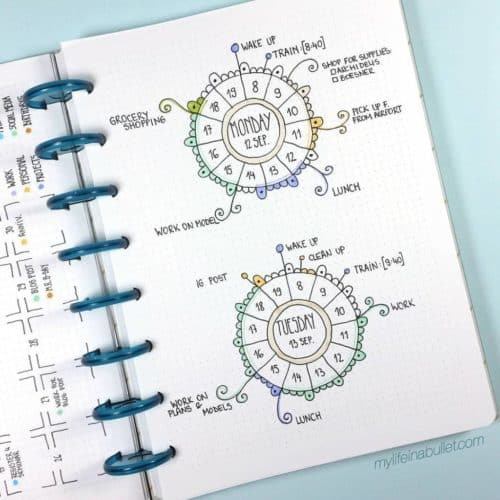
This unique clock idea will give you perspective during the day on how much time you’ve got left to do what you had planned. | My Life in a Bullet

Bills, bills, bills – reminds me of a Beyoncé (Destiny’s Child) song. Whether the act of paying bills brings rhythem or dread, never miss a due date with these Bill Due Budget Tracker Money Stickers. The are great planner stickers for the Erin Condren Life Planner. | Planner Envy (pick up more resources for your planners here.)

Looking for creative planner layouts? This is a pretty slick Bullet Journal Weekly Set Up Template (because why reinvent the wheel?) | Kate Louise

Grow some positive thoughts with a gratitude log. | Jess Maty

To get really creative, and for all you perfectionist, pick up this Bullet Journal Essential Stencil Set. | Jayden’s Apple (get more Bullet Journal Stencils here.)

Are you dividing your bullet journal page into columns and rows, but need to figure out how many grid counts to include in each column/row? Print this free bullet journal grid count reference. | Infinite Planner

This is a cute layout to your daily planner | Source Unknown

We also are pretty in love with this daily planner layout. | Alexandra_Plans

Drinking water is one of my biggest challenges of the day… who are we kidding, raising 5 kids is, but that is a close second! Pick up these mini hydration stickers for your planner! | Wishee Washi (pick up more ideas for your planners here.)

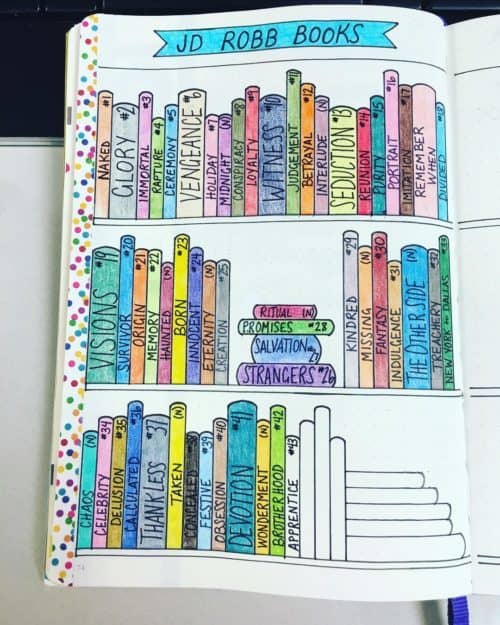
There’s nothing better than a good book. If you love a good book, try creating a bullet journal book tracker. | Bldyson_bujo

Meal Plan with your bullet journal! I love the removeable post it notes for the shopping list and meal prep to do! | Sublime Reflection

Creative Bullet Journal Ideas and Planner Spreads to organize your life. Inspiring layouts you can copy and do yourself! #bujo #bulletjournal Click to Tweet

Spring (Summer, Fall, or Winter) cleaning? Have a daily, weekly, bi-weekly, monthly, or even yearly cleaning list! | My Blue Sky Design

Adventure awaits? Where are you going? Creatively “map” your to do list for your summer travels! | Honey Owl

Don’t forget the packing list. Plan ahead and perhaps forget nothing. We love the inspiration of this Bullet Journal Packing List. | Christina77Star

If you are traveling (or even if you are not), track your savings with this Bullet Journal Savings Tracker. | Start a Mom Blog

Have sleep goals, track your sleep patterns. | Source Unknown

Create a calendar for important dates – have all your accessories on hand: Bullet Journal, Washi Tape, Watercolor Makers, Bullet Journal Stencils, Watercolors, Black Pens, Colored Pens, and more! | Study Duoo


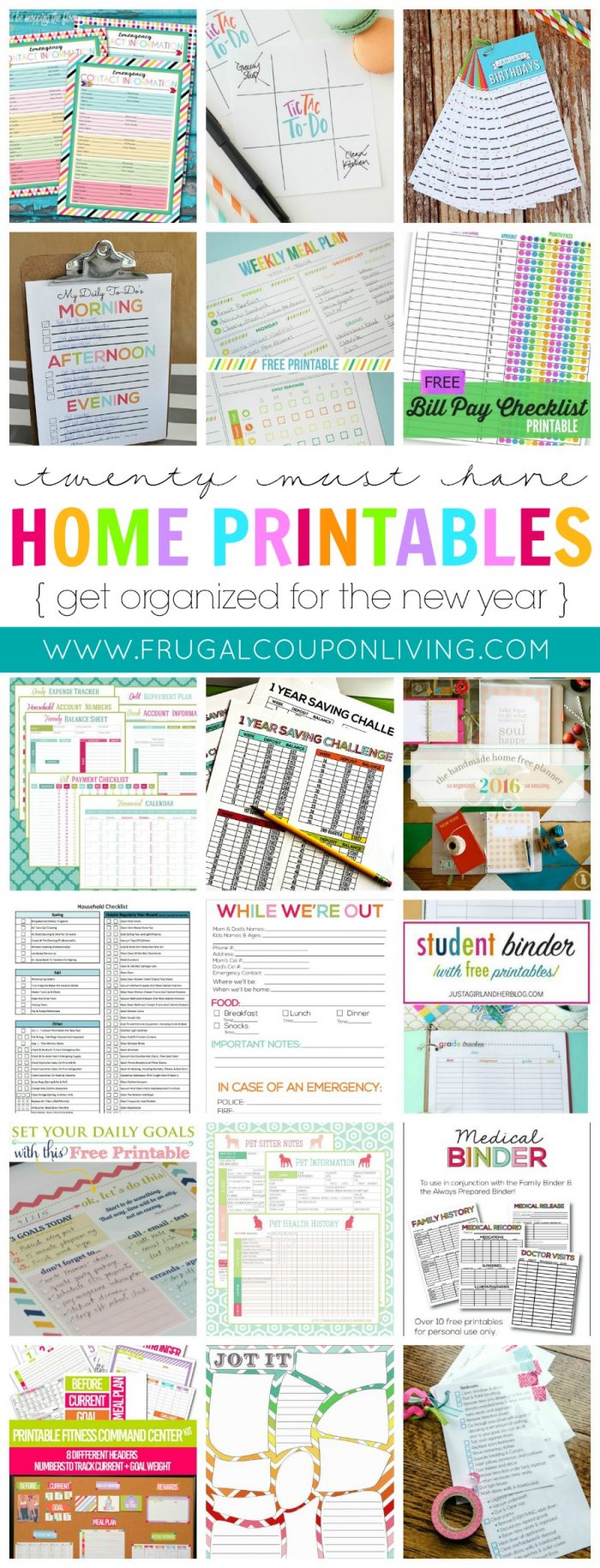
And since you love organizing, take a look at these Home Printables to get Organized for the New Year (even if it is not the new year!) Pin to Pinterest.

We also are pretty inspired by these Family Command Centers (and Homework Center Ideas). Pin to Pinterest.


WHAT’S TRENDING? Looking for a few engaging activities? Grab Minute to Win it Games – Traditional, Holiday, Group, and more! Use these fun activities in the office, classroom, or at your next birthday party.

  • « Previous Page
  • 1
  • …
  • 51
  • 52
  • 53
  • 54
  • 55
  • …
  • 98
  • Next Page »
  • Search
  • Social
  • Categories
  • Archives
Search
  • Email
  • Facebook
  • Instagram
  • Pinterest
  • Twitter
Browse By Category
Browse by Date
I am a wife, mother, daughter, blogger, teacher, friend – a woman of many different hats. My delights are my husband, my five kids, reading, shopping, and spending time with friends and family. I am a Florida girl transferred to the heart of the DC-Metro area. I'm glad you're here! Learn more about Ashley.

Daily Deals – Don’t Miss One!

December 2025
S M T W T F S
 123456
78910111213
14151617181920
21222324252627
28293031  
« Nov    

Copyright © 2025 Frugal Coupon Living | CCPA Policy | Privacy Policy | Disclosure | Disclaimer | Terms of Use | Do Not Sell My Personal Information | Email Sign Up