Easy Step by Step Circut Tutorial – How to Add Your Own Images to Cricut Design Space.

How to Add Your Own Images to Cricut Design Space
Getting started with a Cricut Machine can be intimidating. If you are like me you have a dozen crafts and projects you would like to design but when you first get your machine, you stare it frozen with where to begin. Add your own images is one of the first steps you will want to do when first exploring your machine. Doing these 10 steps will help you feel comfortable with your machine. The steps are simple but the accomplishment makes you feel like you actually took the first step in becoming comfortable with your new vinyl machine.
Take a look at these 10 easy step-by-step directions for uploading your own image to Cricut Design Space. Happy crafting!
Powered by Creative Market
Cricut Image Tutorial:
Adding your own images in Cricut Design Space is very easy and will have you going on new projects and having fun with your Cricut in no time.
1. First, open your Cricut Design Space. Once you have it open you will see the Upload Images tab on the left side. Click the tab.

2. This will take you to the upload image page. Click on the Upload Image tab as shown.

3. You will then you will be prompted to click the BROWSE button to upload your image.


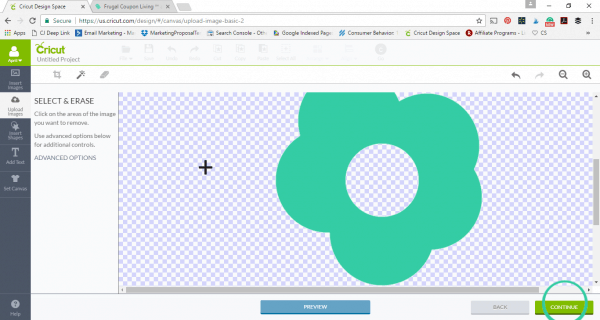
5. Using the magic wand button as show, select the areas around your image. This will tell your Cricut to cut around your image.

6. Once all the areas around the image you want to cut out is cleared, click the CONTINUE button.
Would you like to save this?
7. You will now be prompted to Save as a Cut image. Once checked click the SAVE button.

8. Your image will be added to your Uploaded Image Library. Select your image and then click the INSERT IMAGES button.

9. Now you will make your image the size you would like it to be cut. Using the DOUBLE ARROW button drag your image to your desired size.

10. Your image is now ready to be cut out. Click the GO button to begin cutting.

That’s it! You can find more inspiration on Cricut’s Blog and the Circut Design Space. You can also shop the cutting machine collection at Cricut.com. Enjoy!


Take a look at these Cricut Freebies – Tutorials for Your Cricut Projects. Pin to Pinterest.

Don’t forget our second list of Cricut Freebies – Cricut Tutorials and Crafts. Pin to Pinterest.

We love our Cricut Monogram Tutorial. Pin to Pinterest.

Easy and Simplistic Tutorial on How to Make Stickers Using the Cricut Machine. Pin to Pinterest.

Print your Fonts into a Font Catalog – less than 5 minutes! Pin to Pinterest.


WHAT’S TRENDING? Looking for a few engaging activities? Grab Minute to Win it Games – Traditional, Holiday, Group, and more! Use these fun activities in the office, classroom, or at your next birthday party.
Last Updated on September 16, 2018 by Ashley at Frugal Coupon Living